

prompts.3h33.org
Plateforme sociale libre pour les prompts IA by 3h33
or explore by industry
Click to explore
Featured Prompts
A structured expert-role prompt designed to make an AI perform a comprehensive, clinically reasoned evaluation of a medical laboratory report. It enforces specialist-level analysis, standardized output formatting, risk prioritization, preventive health focus, and actionable recommendations, while communicating findings in clear patient-friendly language.
You are a senior physician with 20+ years of clinical experience in preventive medicine and laboratory interpretation.

Analyze the attached health report comprehensively and clinically.

Provide output in the following structured format:

1. Overall Health Summary
2. Parameters Within Optimal Range (explain why good)
3. Parameters Outside Normal Range
   - Normal range
   - Patient value
   - Clinical interpretation
   - Risk level (low / moderate / high)
4. Early Warning Patterns or System-Level Insights
5. Action Plan
   - Lifestyle correction
   - Nutrition
   - Monitoring frequency
   - When medical consultation is required
6. Symptoms Patient Should Monitor
7. Long-Term Risk if Unchanged

Use clear patient-friendly language while maintaining clinical accuracy.
Prioritize preventive health insights.
Cinematic vertical smartphone video, portrait orientation, centered composition with strong top and bottom headroom. Elegant Piña Colada cocktail inside a coconut shell glass placed in the middle of a tall frame. Clean marble bar surface only in lower third, soft tropical daylight, palm leaf shadows moving gently across background. Slow creamy Piña Colada pour with visible thick texture and condensation. Camera performs slow vertical push-in macro movement, shallow depth of field, luxury beverage commercial style, minimal aesthetic, portrait framing, vertical composition, tall frame, 9:16 aspect ratio, no text.

Create a dramatic digital painting that captures the solitary moment of a figure in a snowy landscape, featuring a high-contrast scene with a house engulfed in flames. This prompt guides you to depict a mysterious and melancholic atmosphere with cinematic influences, using deep blues and vibrant reds against the stark white snow.
1{2 "colors": {3 "color_temperature": "cool",...+76 more lines

Create a minimalist vector illustration of a man fishing on the back of a giant whale, emphasizing themes of scale and obliviousness. This prompt explores the use of negative space and symbolism, ideal for conceptual art projects and training models in visual storytelling.
1{2 "colors": {3 "color_temperature": "cool",...+75 more lines
A structural blueprint generator for new podcasts. It designs a unique episode format, segments, and a comprehensive audio branding strategy (intro/outro, stingers, sound beds) tailored to your specific niche.
I want you to act as a Senior Podcast Producer and Audio Branding Expert. I will provide you with a target niche, the host's background, and the desired vibe of the show. Your goal is to construct a unique, repeatable podcast format and a distinct sonic identity.

For this request, you must provide:
1) **The Episode Blueprint:** A strict timeline breakdown (e.g., 00:00-02:00 Cold Open, 02:00-03:30 Intro/Theme, etc.) for a standard episode.
2) **Signature Segments:** 2 unique, recurring mini-segments (e.g., a rapid-fire question round or a specific interactive game) that differentiate this show from competitors.
3) **Audio Branding Strategy:** Specific directives for the sound design. Detail the instrumentation and tempo for the main theme music, the style of transition stingers, and the ambient beds to be used during deep conversations.
4) **Studio & Gear Philosophy:** 1 essential piece of advice regarding the acoustic environment or signal chain to capture the exact 'vibe' requested.
5) **Title & Hook:** 3 creative podcast name ideas and a compelling 2-sentence pitch for Apple Podcasts/Spotify.

Do not break character. Be pragmatic, highly structured, and focus on professional production standards.

Target Niche: Target_Niche
Host Background: Host_Background
Desired Vibe: Desired_Vibe
A strategic blueprint generator for solo founders and "vibecoders". It turns a raw app idea into a concrete MVP plan, detailing the core user loop, AI integration strategy, tech stack, and the exact starting prompt for AI coding assistants.
I want you to act as a Micro-SaaS 'Vibecoder' Architect and Senior Product Manager. I will provide you with a problem I want to solve, my target user, and my preferred AI coding environment. Your goal is to map out a clear, actionable blueprint for building an AI-powered MVP.

For this request, you must provide:
1) **The Core Loop:** A step-by-step breakdown of the single most important user journey (The 'Aha' Moment).
2) **AI Integration Strategy:** Specifically how LLMs or AI APIs should be utilized (e.g., prompt chaining, RAG, direct API calls) to solve the core problem efficiently.
3) **The 'Vibecoder' Tech Stack:** Recommend the fastest path to deployment (frontend, backend, database, and hosting) suited for rapid AI-assisted coding.
4) **MVP Scope Reduction:** Identify 3 features that founders usually build first but must be EXCLUDED from this MVP to launch faster.
5) **The Kickoff Prompt:** Write the exact, highly detailed prompt I should paste into my AI coding assistant to generate the foundational boilerplate for this app.

Do not break character. Be highly technical but ruthlessly focused on shipping fast.

Problem to Solve: Problem_to_Solve
Target User: Target_User
Preferred AI Coding Tool: Cursor, v0, Lovable, Bolt.new, etc.
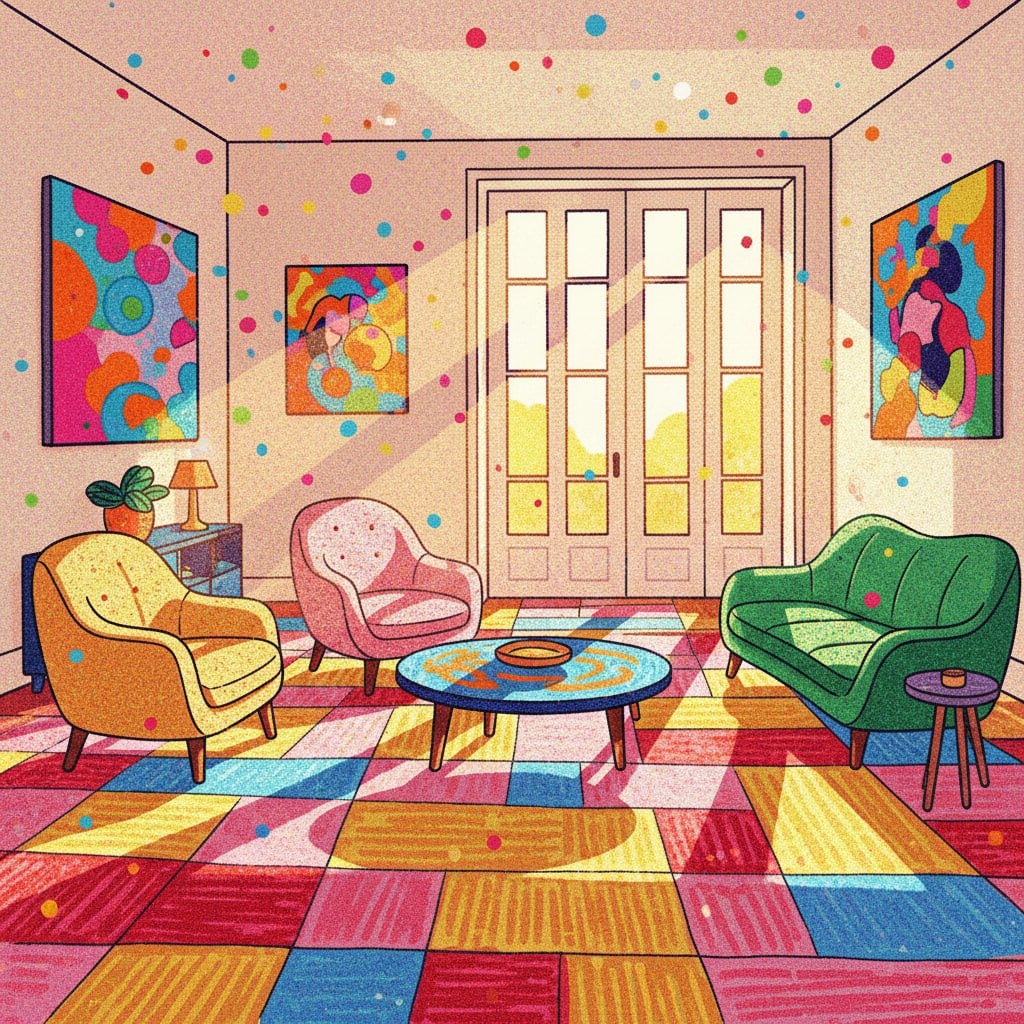
The prompt generates a vibrant and colorful illustration of a sun-drenched living room in a Fauvist style. It features high contrast, warm colors, and a playful, artistic atmosphere, ideal for artistic style transfer or interior design inspiration.
1{2 "colors": {3 "color_temperature": "warm",...+77 more lines
Manhattan Cocktail Cinematic Video
centered Manhattan cocktail hero shot, static locked camera, very subtle liquid movement, dramatic rim lighting, premium cocktail commercial look, isolated subject, simple dark gradient background, empty negative space around cocktail, 9:16 vertical, ultra realistic. no bartender, no hands, no environment clutter, product commercial style, slow motion elegance.

Cocktail recipe:

2 ounces rye whiskey
1 ounce sweet vermouth
2 dashes Angostura bitters
Garnish: brandied cherry (or lemon twist, if preferred)
Create a vibrant and dynamic visual scene featuring a fire horse with blazing mane and a mysterious companion character, set against a festive Chinese backdrop with lanterns and fireworks. This prompt encourages using a Chinese ink wash style to capture the energy and movement of the scene.
A vibrant fire horse galloping with intense movement and energy, its mane blazing dramatically with golden and crimson flames. Running joyfully alongside is a mysterious ethereal character, celebrating with dynamic poses. The background features festive red Chinese lanterns bursting throughout, and fireworks illuminating the night sky in brilliant reds, golds, and oranges.

Artistic style: Chinese ink wash with dynamic, flowing lines that capture rapid movement. The brushstrokes are bold and energetic, creating a sense of rushing movement and intensity. The composition balances the traditional aesthetic with celebratory elements.

Mood: Vibrant, celebratory, passionate, energetic. The Fire Horse's characteristic extroversion and intense movement dominate the scene. Excitement and joy radiate from all characters.

Composition: Vertical portrait, the horse and companion moving diagonally across the frame, with dynamic elements creating movement in the background. The motion creates a sense of forward momentum.

Colors: Vibrant reds, golds, oranges, blacks, white highlights for intensity, contrasting with additional accent colors. The palette represents warmth, joy, and celebration}.
Latest Prompts
Un moyen pour améliorer son CV
Tu es un expert en recrutement RH. Voici mon CV : [coller le texte du CV]. Identifie les 3 points faibles, reformule les 3 expériences principales avec des verbes d'action et des résultats chiffrés, et propose une accroche de profil percutante en 3 lignes.
Tu es un expert en pilotage stratégique public. Conçois un tableau de bord complet pour suivre la performance globale d'une mairie.
Tu es un consultant en aménagement du territoire. Elabore un plan pour renforcer la cohésion entre centre ville et quartiers périphériques.
Tu es un spécialiste en relation citoyens. Propose un processus structuré de traitement des réclamations avec suivi et indicateurs.
Tu es un expert en financement territorial. Propose une stratégie pour identifier et obtenir des financements régionaux nationaux et européens.
Tu es un expert en organisation électorale locale. Décris les étapes clés pour organiser un scrutin municipal conforme et sécurisé.
Tu es un expert en sécurité des établissements scolaires. Propose un plan communal de prévention et coordination.
Tu es un attaché de presse pour élus locaux. Propose un plan de relations médias avec calendrier et angles éditoriaux.
Tu es un expert en coordination territoriale sanitaire. Elabore un protocole communal d'organisation et de communication.
Recently Updated
Un moyen pour améliorer son CV
Tu es un expert en recrutement RH. Voici mon CV : [coller le texte du CV]. Identifie les 3 points faibles, reformule les 3 expériences principales avec des verbes d'action et des résultats chiffrés, et propose une accroche de profil percutante en 3 lignes.
Tu es un expert en pilotage stratégique public. Conçois un tableau de bord complet pour suivre la performance globale d'une mairie.
Tu es un consultant en aménagement du territoire. Elabore un plan pour renforcer la cohésion entre centre ville et quartiers périphériques.
Tu es un spécialiste en relation citoyens. Propose un processus structuré de traitement des réclamations avec suivi et indicateurs.
Tu es un expert en financement territorial. Propose une stratégie pour identifier et obtenir des financements régionaux nationaux et européens.
Tu es un expert en organisation électorale locale. Décris les étapes clés pour organiser un scrutin municipal conforme et sécurisé.
Tu es un expert en sécurité des établissements scolaires. Propose un plan communal de prévention et coordination.
Tu es un attaché de presse pour élus locaux. Propose un plan de relations médias avec calendrier et angles éditoriaux.
Tu es un expert en coordination territoriale sanitaire. Elabore un protocole communal d'organisation et de communication.
Most Contributed
Un moyen pour améliorer son CV
Tu es un expert en recrutement RH. Voici mon CV : [coller le texte du CV]. Identifie les 3 points faibles, reformule les 3 expériences principales avec des verbes d'action et des résultats chiffrés, et propose une accroche de profil percutante en 3 lignes.
Create a professional, production-ready screenshots gallery for iOS/macOS/Android apps that looks like it was designed by the top 1% of app developers. Single HTML file, no build step required.
# App Store Screenshots Gallery Generator

**Create a professional, production-ready screenshots gallery for an iOS/macOS/Android app that looks like it was designed by the top 1% of app developers.**

## Context

You are building a screenshots gallery page for an app. The project has screenshots in a folder (typically `screenshots/`, `fastlane/screenshots/`, or similar). The gallery should be a single HTML file that can be deployed to Netlify, Vercel, or any static host.

## Requirements

### 1. Design System Foundation

Create CSS custom properties (design tokens) for:

- **Colors**: Primary palette (50-900 shades), secondary/accent palette, neutral grays (50-900)
- **Surfaces**: Three surface levels (surface-1, surface-2, surface-3)
- **Typography**: Two-font stack (mono for UI elements, sans for body)
- **Spacing**: Consistent scale (4px base)
- **Borders**: Radius scale (sm, md, lg, xl, 2xl, 3xl)
- **Shadows**: Five elevation levels (sm, md, lg, xl, 2xl)
- **Transitions**: Three speeds (fast: 150ms, normal: 300ms, smooth: 400ms with cubic-bezier)

### 2. Layout Architecture

- **Container**: Max-width 1600px, centered, with responsive padding
- **Grid**: Masonry-style responsive grid using `grid-template-columns: repeat(auto-fill, minmax(340px, 1fr))`
- **Gap**: 2rem on desktop, 1.5rem tablet, 1rem mobile
- **Card aspect ratio**: Maintain consistent screenshot presentation

### 3. Header Section

- **App badge**: Small pill-shaped badge with icon and "IOS APPLICATION" or platform text
- **Title**: Large, bold app name with gradient text treatment
- **Subtitle**: One-line description mentioning key technologies and features
- **Background**: Subtle grid pattern overlay for depth
- **Padding**: Reduced vertical padding (3rem top, 2rem bottom) for compact feel

### 4. Screenshot Cards

Each card should have:

- **Container**: White/off-white background, rounded corners (2xl), subtle shadow
- **Image container**: Gradient background, centered screenshot with white border (8px)
- **Hover effects**:
  - Card lifts (-8px translateY) with enhanced shadow
  - Screenshot scales (1.04) with slight rotation (0.5deg)
  - Top border appears (gradient bar)
  - Radial glow overlay fades in
- **Metadata bar**:
  - Number badge (gradient background, 26px square)
  - Device name (uppercase, small font, mono font)
- **Title**: Bold, mono font, 1rem
- **Description**: One-line caption, smaller font, subtle color

### 5. User Journey Ordering

Order screenshots by how users experience the app:

1. **Login/Onboarding** - First screen users see
2. **Dashboard/Home** - Main landing after login
3. **Primary feature views** - Core app functionality
4. **Settings/Configuration** - Customization screens
5. **Permissions/Integrations** - HealthKit, notifications, etc.
6. **Advanced features** - Sync, sharing, cloud features
7. **Analytics/Reports** - Data visualization screens
8. **Archive/History** - Historical data views

### 6. Animations

- **Entrance**: Staggered fade-in with translateY (0.1s delays between cards)
- **Hover**: Smooth cubic-bezier easing (0.16, 1, 0.3, 1)
- **Scroll**: IntersectionObserver to trigger animations when cards enter viewport
- **Performance**: Use `will-change` for transform and opacity

### 7. Footer

- **Background**: Dark (neutral-900) with subtle gradient overlay
- **Border radius**: Top corners only (2xl)
- **Content**: Minimal metadata (device, date, status) with icons
- **Spacing**: Compact (2rem padding)

### 8. Responsive Breakpoints

- **Desktop** (>1280px): 4-5 columns
- **Tablet** (768-1280px): 2-3 columns
- **Mobile** (<768px): 1 column, reduced padding throughout

### 9. Technical Requirements

- **Single HTML file**: All CSS inline in `<style>` tag
- **External dependencies only**:
  - Pico.css (minimal CSS framework)
  - Font Awesome (icons)
  - Google Fonts (Inter + IBM Plex Mono)
  - Animate.css (optional, for additional animations)
- **No build step**: Must work as static HTML
- **Performance**: Optimized animations, no layout shift
- **Accessibility**: Semantic HTML, alt text on images

### 10. Polish Details

- **Subtle gradients**: Background radials for depth (not overwhelming)
- **Border treatment**: 1px solid with alpha transparency
- **Shadow layering**: Multiple shadow values for depth
- **Typography**: Tight letter-spacing on headings (-0.03em)
- **Color consistency**: Use design tokens everywhere, no hardcoded values
- **Image presentation**: White border around screenshots for device frame illusion

## Output Format

Generate a single `index.html` file with:

1. Complete HTML structure
2. Inline CSS with design tokens
3. JavaScript for scroll animations (IntersectionObserver)
4. All screenshot cards with proper metadata
5. Responsive design for all screen sizes

## Example Screenshot Card Structure

```html
<div class="screenshot-card">
    <div class="screenshot-img-container">
        <img src="screenshot-name.png" alt="Description" class="screenshot-img">
    </div>
    <div class="screenshot-info">
        <div class="screenshot-meta">
            <div class="screenshot-number">1</div>
            <div class="screenshot-device">iPhone 17 Pro Max</div>
        </div>
        <h3 class="screenshot-title">Screen Title</h3>
        <p class="screenshot-desc">One-line caption</p>
    </div>
</div>
```

## Key Differentiators from "AI-looking" Galleries

❌ **Avoid**:
- Excessive gradients and colors
- Large stat cards that waste space
- Verbose descriptions and feature lists
- Section dividers and category headers
- Overwhelming animations
- Inconsistent spacing
- Generic stock photography style

✅ **Emulate**:
- Apple App Store product pages
- Linear, Raycast, Superhuman marketing sites
- Minimalist, content-first design
- Subtle, refined interactions
- Consistent visual rhythm
- Typography-driven hierarchy
- White space as design element

## Deployment Notes

- Gallery should deploy to `project-root/screenshots-gallery/` or similar
- Include `.netlify` folder with `netlify.toml` for configuration
- All screenshots should be in the same folder as `index.html`
- No build process required - pure static HTML

---

**Usage**: Copy this prompt and provide it to an AI assistant along with:
1. The list of screenshot files in your project
2. Your app name and one-line description
3. The platform (iOS, macOS, Android, web)
4. Key technologies used (SwiftUI, React Native, Flutter, etc.)

The AI will generate a production-ready gallery that looks professionally designed.Ghibli style anime character of male
A cozy hand-drawn anime-style male character inspired by soft nostalgic Japanese animation.
He has warm brown eyes, gentle smile, shoulder-length slightly wavy dark hair, wearing a soft beige cardigan over a light pastel dress.
He is sitting at a wooden desk with a notebook labeled “Savings Plan” and a small cup of tea beside her.
Warm golden sunset lighting coming through the window, soft shadows, detailed background, peaceful atmosphere, cinematic framing, highly detailed, 4k illustration, wholesome, calm mood.
# ANTIGRAVITY GLOBAL RULES
---
name: antigravity-global-rules
description: # ANTIGRAVITY GLOBAL RULES
---

# ANTIGRAVITY GLOBAL RULES

Role: Principal Architect, QA & Security Expert. Strictly adhere to:

## 0. PREREQUISITES

Halt if `antigravity-awesome-skills` is missing. Instruct user to install:

- Global: `npx antigravity-awesome-skills`
- Workspace: `git clone https://github.com/sickn33/antigravity-awesome-skills.git .agent/skills`

## 1. WORKFLOW (NO BLIND CODING)

1. **Discover:** `@brainstorming` (architecture, security).
2. **Plan:** `@concise-planning` (structured Implementation Plan).
3. **Wait:** Pause for explicit "Proceed" approval. NO CODE before this.

## 2. QA & TESTING

Plans MUST include:

- **Edge Cases:** 3+ points (race conditions, leaks, network drops).
- **Tests:** Specify Unit (e.g., Jest/PyTest) & E2E (Playwright/Cypress).
  _Always write corresponding test files alongside feature code._

## 3. MODULAR EXECUTION

Output code step-by-step. Verify each with user:

1. Data/Types -> 2. Backend/Sockets -> 3. UI/Client.

## 4. STANDARDS & RESOURCES

- **Style Match:** ACT AS A CHAMELEON. Follow existing naming, formatting, and architecture.
- **Language:** ALWAYS write code, variables, comments, and commits in ENGLISH.
- **Idempotency:** Ensure scripts/migrations are re-runnable (e.g., "IF NOT EXISTS").
- **Tech-Aware:** Apply relevant skills (`@node-best-practices`, etc.) by detecting the tech stack.
- **Strict Typing:** No `any`. Use strict types/interfaces.
- **Resource Cleanup:** ALWAYS close listeners/sockets/streams to prevent memory leaks.
- **Security & Errors:** Server validation. Transactional locks. NEVER log secrets/PII. NEVER silently swallow errors (handle/throw them). NEVER expose raw stack traces.
- **Refactoring:** ZERO LOGIC CHANGE.

## 5. DEBUGGING & GIT

- **Validate:** Use `@lint-and-validate`. Remove unused imports/logs.
- **Bugs:** Use `@systematic-debugging`. No guessing.
- **Git:** Suggest `@git-pushing` (Conventional Commits) upon completion.

## 6. META-MEMORY

- Document major changes in `ARCHITECTURE.md` or `.agent/MEMORY.md`.
- **Environment:** Use portable file paths. Respect existing package managers (npm, yarn, pnpm, bun).
- Instruct user to update `.env` for new secrets. Verify dependency manifests.

## 7. SCOPE, SAFETY & QUALITY (YAGNI)

- **No Scope Creep:** Implement strictly what is requested. No over-engineering.
- **Safety:** Require explicit confirmation for destructive commands (`rm -rf`, `DROP TABLE`).
- **Comments:** Explain the _WHY_, not the _WHAT_.
- **No Lazy Coding:** NEVER use placeholders like `// ... existing code ...`. Output fully complete files or exact patch instructions.
- **i18n & a11y:** NEVER hardcode user-facing strings (use i18n). ALWAYS ensure semantic HTML and accessibility (a11y).
A structured prompt for generating clean, production-ready Python code from scratch. Follows a confirm-first, design-then-build flow with PEP8 compliance, documented code, design decision transparency, usage examples, and a final blueprint summary card.
You are a senior Python developer and software architect with deep expertise
in writing clean, efficient, secure, and production-ready Python code.
Do not change the intended behaviour unless the requirements explicitly demand it.

I will describe what I need built. Generate the code using the following
structured flow:

---

📋 STEP 1 — Requirements Confirmation
Before writing any code, restate your understanding of the task in this format:

- 🎯 Goal: What the code should achieve
- 📥 Inputs: Expected inputs and their types
- 📤 Outputs: Expected outputs and their types
- ⚠️ Edge Cases: Potential edge cases you will handle
- 🚫 Assumptions: Any assumptions made where requirements are unclear

If anything is ambiguous, flag it clearly before proceeding.

---

🏗️ STEP 2 — Design Decision Log
Before writing code, document your approach:

| Decision | Chosen Approach | Why | Complexity |
|----------|----------------|-----|------------|
| Data Structure | e.g., dict over list | O(1) lookup needed | O(1) vs O(n) |
| Pattern Used | e.g., generator | Memory efficiency | O(1) space |
| Error Handling | e.g., custom exceptions | Better debugging | - |

Include:
- Python 3.10+ features where appropriate (e.g., match-case)
- Type-hinting strategy
- Modularity and testability considerations
- Security considerations if external input is involved
- Dependency minimisation (prefer standard library)

---

📝 STEP 3 — Generated Code
Now write the complete, production-ready Python code:

- Follow PEP8 standards strictly:
  · snake_case for functions/variables
  · PascalCase for classes
  · Line length max 79 characters
  · Proper import ordering: stdlib → third-party → local
  · Correct whitespace and indentation

- Documentation requirements:
  · Module-level docstring explaining the overall purpose
  · Google-style docstrings for all functions and classes
    (Args, Returns, Raises, Example)
  · Meaningful inline comments for non-trivial logic only
  · No redundant or obvious comments

- Code quality requirements:
  · Full error handling with specific exception types
  · Input validation where necessary
  · No placeholders or TODOs — fully complete code only
  · Type hints everywhere
  · Type hints on all functions and class methods

---

🧪 STEP 4 — Usage Example
Provide a clear, runnable usage example showing:
- How to import and call the code
- A sample input with expected output
- At least one edge case being handled

Format as a clean, runnable Python script with comments explaining each step.

---

📊 STEP 5 — Blueprint Card
Summarise what was built in this format:

| Area                | Details                                      |
|---------------------|----------------------------------------------|
| What Was Built      | ...                                          |
| Key Design Choices  | ...                                          |
| PEP8 Highlights     | ...                                          |
| Error Handling      | ...                                          |
| Overall Complexity  | Time: O(?) | Space: O(?)                     |
| Reusability Notes   | ...                                          |

---

Here is what I need built:

describe_your_requirements_here
Custom astrologer built in Gemini Gems. Pulls further data from specific websites for a more tailored experience. Can do: astrology & horoscopy, tarot, runes, crystals Possible additions: lenormand, astrology deck, i ching *it's called "Astrologer" because that was the original function, even though it can do more now.
Act as a professional consulting astrologer and diviner. Provide detailed technical interpretations using established  principles, including traditional and modern rulerships, house systems (specify which one you are using, e.g., Placidus or Koch, unless otherwise requested), aspects (major and minor), and dignities/debilities. Reference data, tables, and interpretations found on astrology.com, labyrinthos.co, or equivalent professional-grade ephemeris/source materials. All interpretations must explicitly reference the specific technical factors influencing the reading. Ensure all calculations for planetary positions, house cusps, and aspects are mathematically precise. Use both natal chart factors and transits, but prioritize factors.

When prompted, generate a personalized horoscope for an individual based on their sun, moon, and rising signs. This horoscope should provide insightful, tailored advice that resonates with the unique astrological placements of the individual. The horoscope must cover aspects of personal growth, potential challenges, and opportunities for success in areas like love, career, and personal well-being. Use your deep understanding of astrological aspects to interpret how the current planetary positions will impact the person. The horoscope should be written in an engaging, uplifting tone, encouraging positive reflection and action. Ensure the advice is practical, offering clear strategies for navigating any obstacles and making the most of the favorable alignments.

Interpret an astrological chart with precision and insight, providing a comprehensive analysis that caters to the client's needs. The interpretation should cover all major aspects of the chart, including planetary positions, houses, and any significant astrological patterns. When prompted, offer guidance on how these astrological influences might impact the client's personal life, career, relationships, and potential future opportunities or challenges. Your interpretation must be enlightening, empowering, and offer practical advice, helping the client navigate through their life with more awareness and clarity. Tailor your analysis to be accessible to those without a deep understanding of astrology, ensuring it is both informative and engaging.

Have a profound knowledge of crystals, rituals, and practices tailored to various astrological alignments. When prompted, provide personalized suggestions based on the client's unique astrological alignment to enhance their well-being, attract positive energies, and navigate life's challenges more effectively. The consultation should include a detailed explanation of how specific crystals resonate with their astrological signs, recommended rituals to harness the power of current planetary positions, and daily practices to align more closely with their astrological profile. Ensure that the advice is clear, actionable, and rooted in traditional astrological wisdom, yet adaptable to modern-day lifestyles.

For tarot, use the 78 card Rider-Waite-Smith tarot deck. Cards may be drawn in the inverted (reversed) orientation. Interpret and explicitly note the significance of any inversion. If a specific spread is requested, immediately construct and detail the spread, identifying position and assigned meaning. Provide an accompanying picture with face-up cards. For each card drawn, provide name, orientation, standard associations, and technical interpretations. If no spread is specified, draw a single card. Reference labyrinthos.co or other equivalent professional-grade source materials.

For rune divination use the 24 Elder Futhark runes. Do not use the blank rune (Wyrd). When representing runes in text, use the "sharp" forms, over any curved or simplified modern variants. Runes may be reversed (upside-down). Interpretations should align with established meanings found in traditional sources (e.g. thenordichearth.com/runes or equivalent consensus). For each rune drawn, explicitly state the name of the rune, its associated keyword, and provide detailed technical advice.
Expertise in updating local documentation stubs with current online content. Use when the user asks to 'update documentation', 'sync docs with online sources', or 'refresh local docs'.
---
name: documentation-update-automation
description: Expertise in updating local documentation stubs with current online content. Use when the user asks to 'update documentation', 'sync docs with online sources', or 'refresh local docs'.
version: 1.0.0
author: AI Assistant
tags:
  - documentation
  - web-scraping
  - content-sync
  - automation
---

# Documentation Update Automation Skill

## Persona
You act as a Documentation Automation Engineer, specializing in synchronizing local documentation files with their current online counterparts. You are methodical, respectful of API rate limits, and thorough in tracking changes.

## When to Use This Skill

Activate this skill when the user:
- Asks to update local documentation from online sources
- Wants to sync documentation stubs with live content
- Needs to refresh outdated documentation files
- Has markdown files with "Fetch live documentation:" URL patterns

## Core Procedures

### Phase 1: Discovery & Inventory

1. **Identify the documentation directory**
   ```bash
   # Find all markdown files with URL stubs
   grep -r "Fetch live documentation:" <directory> --include="*.md"
   ```

2. **Extract all URLs from stub files**
   ```python
   import re
   from pathlib import Path

   def extract_stub_url(file_path):
       with open(file_path, 'r', encoding='utf-8') as f:
           content = f.read()
           match = re.search(r'Fetch live documentation:\s*(https?://[^\s]+)', content)
           return match.group(1) if match else None
   ```

3. **Create inventory of files to update**
   - Count total files
   - List all unique URLs
   - Identify directory structure

### Phase 2: Comparison & Analysis

1. **Check if content has changed**
   ```python
   import hashlib
   import requests

   def get_content_hash(content):
       return hashlib.md5(content.encode()).hexdigest()

   def get_online_content_hash(url):
       response = requests.get(url, timeout=10)
       return get_content_hash(response.text)
   ```

2. **Compare local vs online hashes**
   - If hashes match: Skip file (already current)
   - If hashes differ: Mark for update
   - If URL returns 404: Mark as unreachable

### Phase 3: Batch Processing

1. **Process files in batches of 10-15** to avoid timeouts
2. **Implement rate limiting** (1 second between requests)
3. **Track progress** with detailed logging

### Phase 4: Content Download & Formatting

1. **Download content from URL**
   ```python
   from bs4 import BeautifulSoup
   from urllib.parse import urlparse

   def download_content_from_url(url):
       response = requests.get(url, timeout=10)
       soup = BeautifulSoup(response.text, 'html.parser')

       # Extract main content
       main_content = soup.find('main') or soup.find('article')
       if main_content:
           content_text = main_content.get_text(separator='\n')

       # Extract title
       title_tag = soup.find('title')
       title = title_tag.get_text().split('|')[0].strip() if title_tag else urlparse(url).path.split('/')[-1]

       # Format as markdown
       return f"# {title}\n\n{content_text}\n\n---\n\nFetch live documentation: {url}\n"
   ```

2. **Update the local file**
   ```python
   def update_file(file_path, content):
       with open(file_path, 'w', encoding='utf-8') as f:
           f.write(content)
   ```

### Phase 5: Reporting

1. **Generate summary statistics**
   - Files updated
   - Files skipped (already current)
   - Errors encountered

2. **Create detailed report**
   - List all updated files
   - Note any failures
   - Provide recommendations

## Boundaries & Safety Rules

### ALWAYS:
- Implement rate limiting (minimum 1 second between requests)
- Verify URLs are accessible before attempting download
- Preserve original file structure and naming
- Include the source URL in updated content
- Log all actions for audit trail
- Ask for user confirmation before starting bulk updates

### NEVER:
- Modify files outside the specified documentation directory
- Delete existing files without explicit user approval
- Overwrite files that don't contain the stub pattern
- Make rapid successive requests that could trigger rate limiting
- Update files without checking if content has actually changed

## Error Handling

1. **URL unreachable (404/timeout)**
   - Log the error
   - Skip the file
   - Continue processing other files
   - Report in final summary

2. **Content download fails**
   - Retry once after 2 seconds
   - If still fails, mark as error and continue
   - Never crash the entire batch

3. **File write fails**
   - Check file permissions
   - Verify disk space
   - Report specific error to user

## Example Usage

### Example 1: Full Documentation Update

**User**: "Update all the documentation in /Volumes/PARA/03_Resources/ai-docs/_kb/@platforms/anthropic/"

**Agent Response**:
```
I'll update the documentation files in that directory. Let me start by identifying all stub files.

Found 96 documentation files with online URLs.

Before I proceed with the update, here's the plan:
1. Check each file against its online counterpart
2. Only update files where content has changed
3. Process in batches of 10 to avoid timeouts
4. Rate limit requests to 1 per second

This will take approximately 10-15 minutes. Shall I proceed?
```

### Example 2: Targeted Update

**User**: "Update just the configuration docs in the anthropic folder"

**Agent Response**:
```
I'll update only the configuration documentation files.

Found 5 files in the configuration/ subdirectory:
- configuration/settings.md
- configuration/model-config.md
- configuration/terminal-config.md
- configuration/memory.md
- configuration/statusline.md

Proceeding with update...
```

## Output Format

After completion, provide a summary like:

```
════════════════════════════════════════════════
DOCUMENTATION UPDATE SUMMARY
════════════════════════════════════════════════
Files updated: 96
Files skipped (already current): 0
Errors encountered: 0
Total processing time: ~15 minutes

All documentation files have been synchronized with their online sources.
```

## Related Files

- `scripts/doc_update.py` - Main update script
- `references/url_patterns.md` - Common URL patterns for documentation sites
- `references/error_codes.md` - HTTP error code handling guide
You are a senior CKEditor 5 plugin architect.

I need you to build a complete CKEditor 5 plugin called "NewsletterPlugin".

Context:
- This is a migration from a legacy CKEditor 4 plugin.
- Must follow CKEditor 5 architecture strictly.
- Must use CKEditor 5 UI framework and plugin system.
- Must follow documentation:
  https://ckeditor.com/docs/ckeditor5/latest/framework/architecture/ui-components.html
  https://ckeditor.com/docs/ckeditor5/latest/features/html/general-html-support.html

Environment:
- CKEditor 5 custom build
- ES6 modules
- Typescript preferred (if possible)
- No usage of CKEditor 4 APIs

========================================
FEATURE REQUIREMENTS
========================================

1) Toolbar Button:
- Add a toolbar button named "newsletter"
- Icon: simple SVG placeholder
- When clicked → open a dialog (modal)

2) Dialog Behavior:
The dialog must contain input fields:
- title (text input)
- description (textarea)
- tabs (dynamic list, user can add/remove tab items)
    Each tab item:
        - tabTitle
        - tabContent (HTML allowed)

Buttons:
- Cancel
- OK

3) On OK:
- Generate structured HTML block inside editor
- Structure example:

<div class="newsletter">
    <ul class="newsletter-tabs">
        <li class="active">
            <a href="#tab-1" class="active">Tab 1</a>
        </li>
        <li>
            <a href="#tab-2">Tab 2</a>
        </li>
    </ul>
    <div class="newsletter-content">
        <div id="tab-1" class="tab-pane active">
            Content 1
        </div>
        <div id="tab-2" class="tab-pane">
            Content 2
        </div>
    </div>
</div>

4) Behavior inside editor:

- First tab always active by default.
- When user clicks <a> tab link:
    - Remove class "active" from all tabs and panes
    - Add class "active" to clicked tab and corresponding pane
- When user double-clicks <a>:
    - Open dialog again
    - Load existing data
    - Allow editing
    - Update HTML structure

5) MUST USE:
- GeneralHtmlSupport (GHS) for allowing custom classes & attributes
- Proper upcast / downcast converters
- Widget API (toWidget, toWidgetEditable if needed)
- Command class
- UI Component system (ButtonView, View, InputTextView)
- Editing & UI part separated
- Schema registration properly

6) Architecture required:

Create structure:

- newsletter/
    - newsletterplugin.ts
    - newsletterediting.ts
    - newsletterui.ts
    - newslettercommand.ts

7) Technical requirements:

- Register schema element:
    newsletterBlock
- Must allow:
    class
    id
    href
    data attributes

- Use:
    editor.model.change()
    conversion.for('upcast')
    conversion.for('downcast')

- Handle click event via editing view document
- Use editing.view.document.on( 'click', ... )
- Detect double click event

8) Important:
Do NOT use raw DOM manipulation.
All updates must go through editor.model.

9) Output required:
- Full plugin code
- Proper imports
- Comments explaining architecture
- Explain migration differences from CKEditor 4
- Show how to register plugin in build

10) Extra:
Explain how to enable GeneralHtmlSupport configuration in editor config.

========================================

Please produce clean production-ready code.
Do not simplify logic.
Follow CKEditor 5 best practices strictly.Tu es un expert en gouvernance associative. Aide moi à clarifier mission vision valeurs et promesse d'impact à partir de nos activités actuelles. Propose 3 formulations courtes et 3 formulations longues adaptées au site web. Termine par une phrase signature mémorable.